.svg?fit=max&auto=format&n=mg7j3j61cBmODq_w&q=85&s=9d6b9cab54b8d7683318a9eec2df333d)
.svg?fit=max&auto=format&n=mg7j3j61cBmODq_w&q=85&s=25c26e62fec62cbde9a4e8913d45aadf)
Open the Proposals tab
From My Jobs, select a published job. The job workspace opens with tabs for Proposals, Instructions, Job Posting, and Settings. Jobs with hired AI trainers also show job messages and contract details.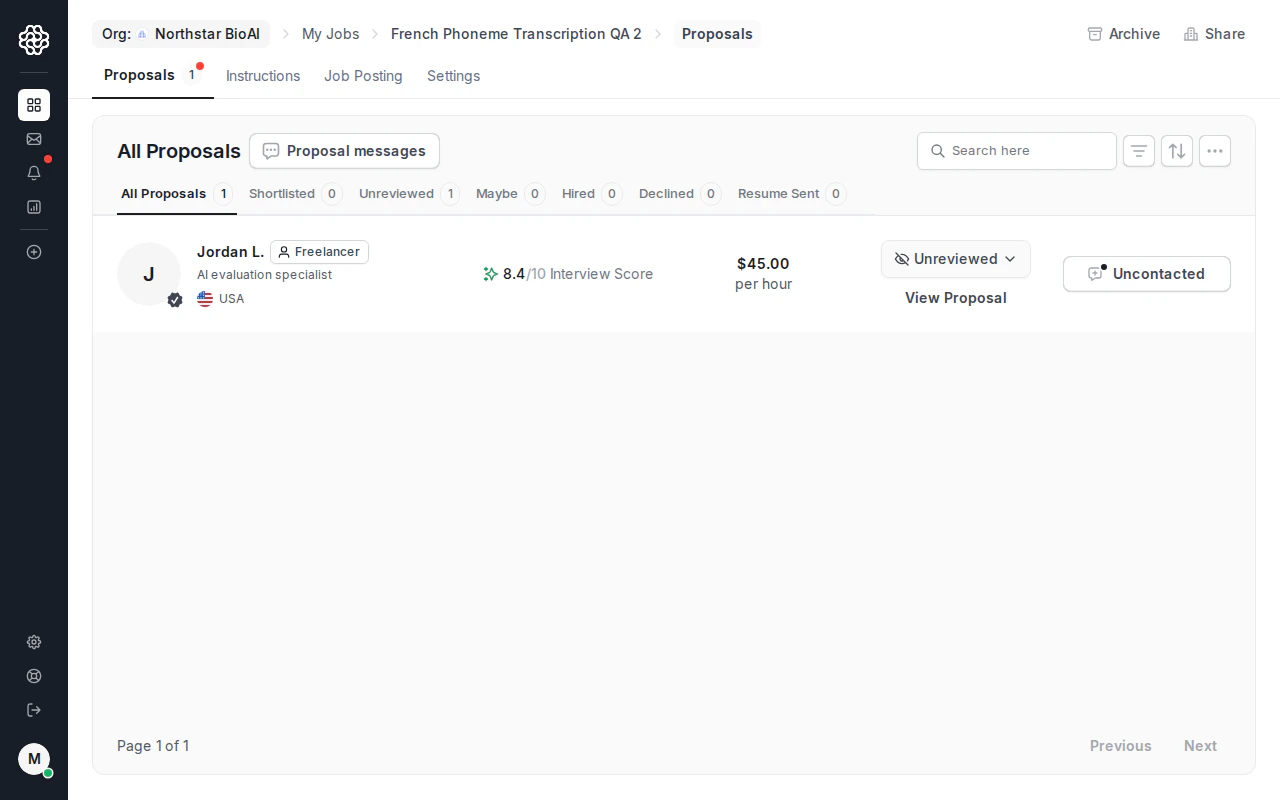
Decide who to review first
Proposal rows help you triage candidates quickly:- Interview score summarizes the AI interview result.
- Status filters separate all, shortlisted, unreviewed, maybe, hired, declined, and resume-sent candidates.
- Rate shows the candidate’s proposed pricing.
- Proposal messages opens pre-hire conversations for candidate questions.
- View Proposal opens the candidate’s full proposal and profile context.
Message candidates before hiring
Use proposal messages for pre-hire questions about availability, work samples, domain experience, or project details. Proposal messages stay tied to the proposal. After you hire, OpenTrain creates a separate job message thread for post-hire work. Keep delivery instructions, milestone questions, and ongoing coordination in the job message thread.Hire an AI trainer
When you are ready to hire:Review the candidate context
Check the proposal message, AI interview answers, resume/profile context, rate, and any screening signals.
Fund the first milestone
OpenTrain collects payment through Stripe and marks the first milestone as funded.
What happens after hire
The job workspace becomes the project control surface:- Messages — post-hire communication with the AI trainer.
- Contract — active contract and milestone timeline.
- Instructions — task guidelines for hired AI trainers.
- Job Posting — the published job details.
- Settings — job configuration and visibility controls.